
How to Use MoatScope
A complete guide to screening stocks through the lens of competitive advantage. Learn how to read the Quality × Valuation grid, understand moat ratings, see what drives each business, and find high-quality businesses at reasonable prices.
🔭 What is MoatScope?
MoatScope is a stock research platform built around one core idea: the best investments combine high business quality with reasonable valuation. We map every stock on a Quality × Valuation grid so you can instantly spot great businesses that the market may be underpricing.
MoatScope tracks nearly 10,000 US-listed stocks, and 5,800+ of them carry a moat rating and a seven-pillar quality score. More than 3,000 of those also have a three-tier fair value estimate; those are the ones plotted on the grid. Every rated stock also gets a return engine and a revenue model, and more than a third carry one or more themes. The rest are searchable, with analysis rolling out continuously.
Unlike traditional stock screeners that flood you with raw data, MoatScope focuses on the interpretive layer — moat analysis, a seven-pillar quality scoring system, management evaluations, fair value estimates, and a plain description of how each business makes its money — to help you understand why a company is (or isn't) a high-quality business.
📊 The Quality × Valuation Scatter Plot
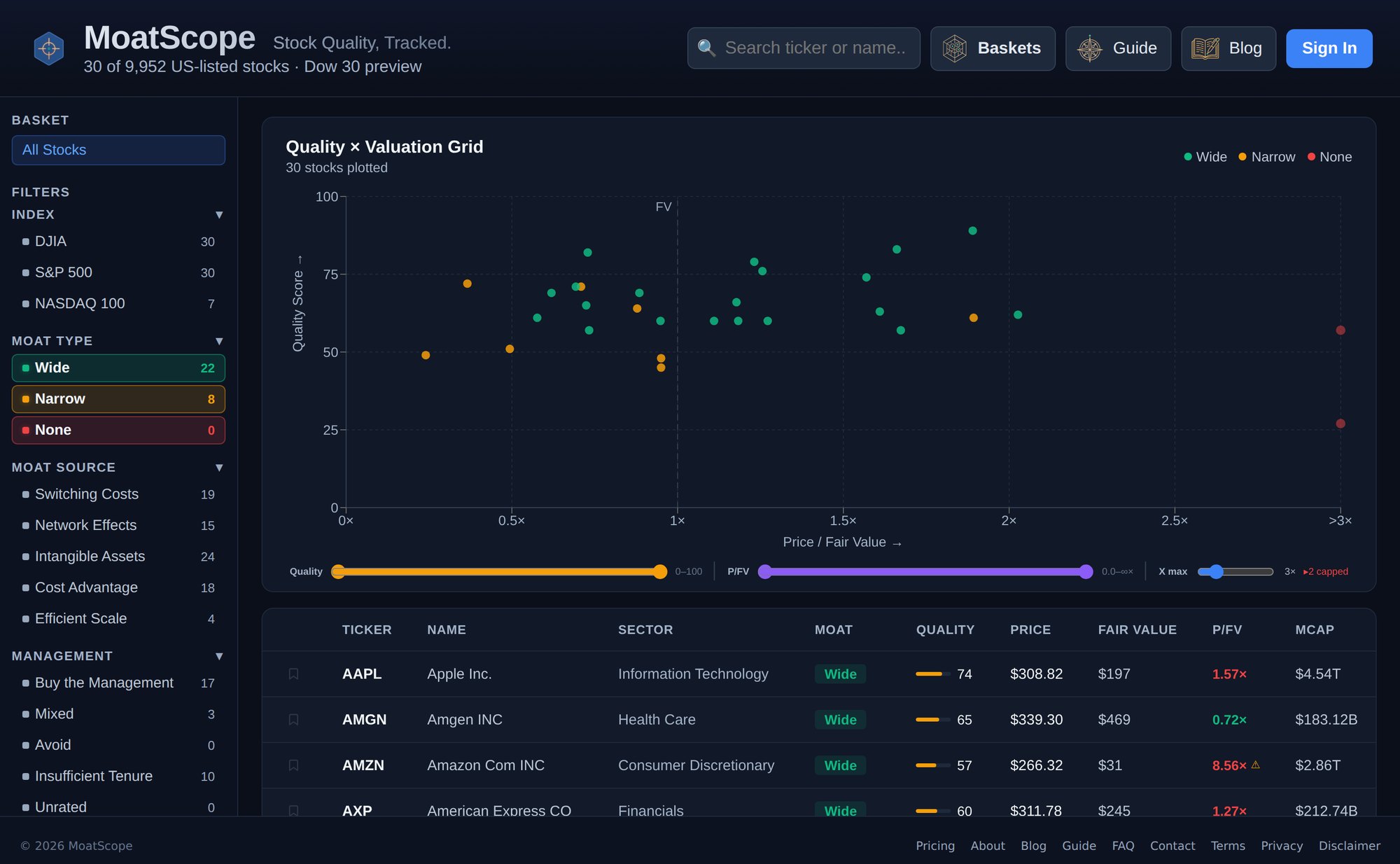
The scatter plot is the heart of MoatScope. Each dot represents a stock, positioned by two dimensions:
Y-axis — Quality Score (0–100): Higher means stronger fundamentals — better margins, higher returns on capital, more consistent cash generation, and a wider moat.
X-axis — Price / Fair Value (P/FV): Shows how the market price compares to MoatScope's fair value estimate. A P/FV of 1.0× means the stock trades at exactly fair value. Below 1.0× suggests undervaluation; above 1.0× suggests a premium.
Dots are color-coded by moat rating:
The vertical dashed line labeled FV marks the 1.0× fair value boundary. Stocks to the left of this line trade below their estimated fair value; stocks to the right trade at a premium.
Range sliders below the chart let you filter the visible range for both Quality Score and P/FV ratio. You can also adjust the X-axis maximum to zoom into stocks trading near fair value.
🏰 Moat Ratings
An economic moat is a durable competitive advantage that protects a company's profits from competitors — like a castle moat protects against invaders. MoatScope classifies every analyzed stock into one of three ratings:
The company has strong, durable competitive advantages that are likely to persist for 20+ years. Think Visa's payment network, Microsoft's enterprise ecosystem, or Apple's hardware-software lock-in.
The company has meaningful competitive advantages, but they're less durable or narrower in scope. Could persist 10–20 years. Examples include regional banks with strong deposit franchises or specialized manufacturers.
The company lacks a sustainable competitive advantage. Operates in a commoditized market, faces intense competition, or has no structural barriers protecting profitability.
Moat sources identify where the advantage comes from. MoatScope tracks five moat sources from the Morningstar framework:
Switching Costs — Customers face high costs (time, money, disruption) to switch away.
Network Effects — The product becomes more valuable as more people use it.
Intangible Assets — Brands, patents, licenses, or regulatory approvals that competitors can't easily replicate.
Cost Advantage — Structural ability to produce at lower cost than competitors.
Efficient Scale — Serves a market of limited size, discouraging new entrants.
⭐ Quality Score (0–100)
The Quality Score measures fundamental business quality on a scale from 0 to 100. It combines seven weighted pillars of financial analysis:
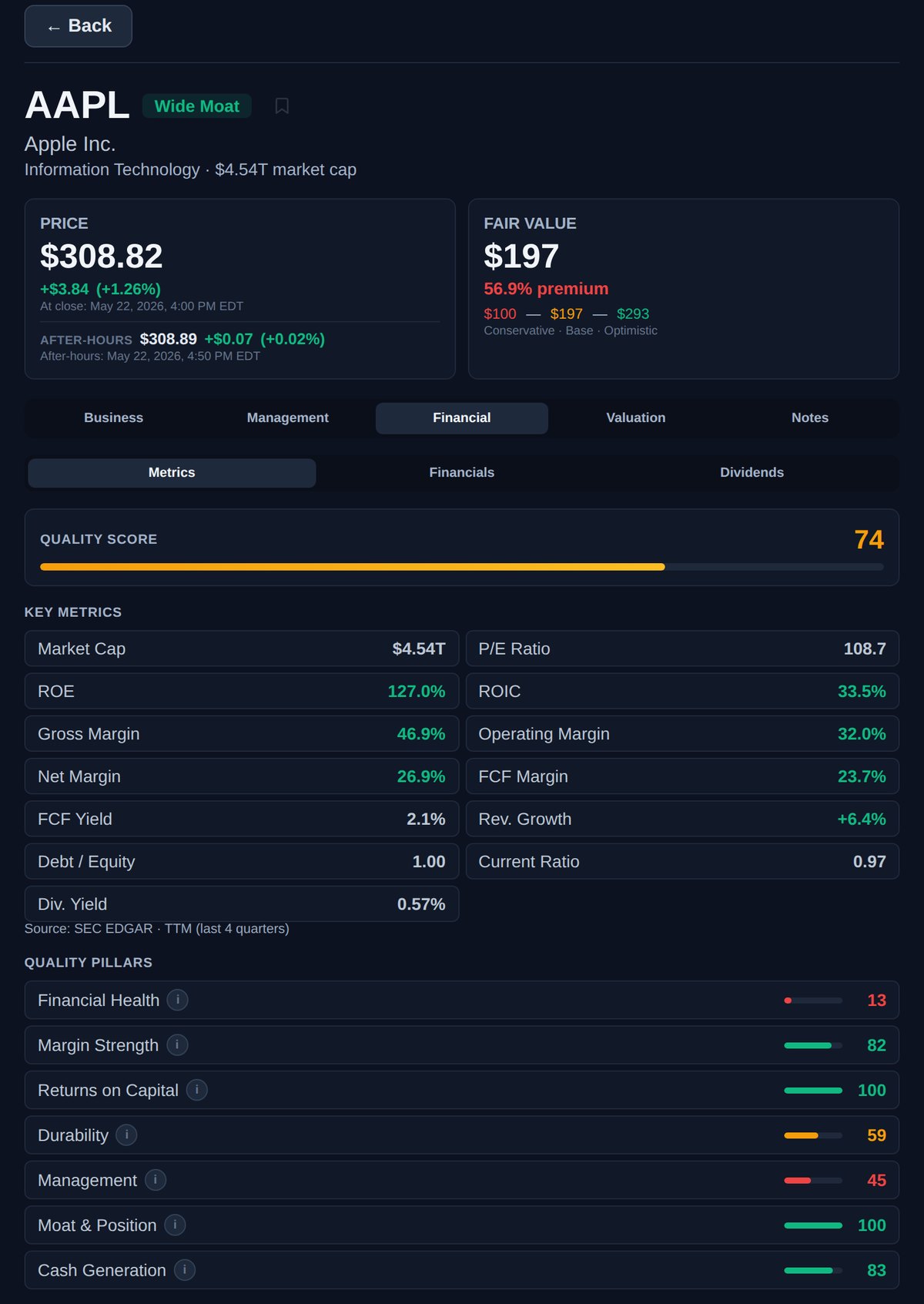
How to interpret the score:
💰 Fair Value Estimates
MoatScope calculates three fair value estimates for each stock, representing conservative, base, and optimistic scenarios:
The formula uses owner earnings (net income + depreciation & amortization − preferred dividends − capital expenditures), adjusted for cash and debt on the balance sheet:
where Cash Flow = Net Income + D&A − Preferred Dividends − CapEx
The P/FV ratio shown in the table and on the X-axis divides the current market price by the Base fair value estimate. A P/FV below 1.0× indicates the stock trades below estimated fair value; above 1.0× indicates a premium.
Owner earnings don't suit every company. When they are negative, the fair value shows as N/M (not meaningful) and the stock stays off the grid. When an estimate rests on a limited version of the model — for example, for a business in a heavy reinvestment phase — the fair value card carries a low-confidence flag that explains why, and the table shows a ⚠ next to its P/FV.
🧭 Engine, Revenue Model & Themes
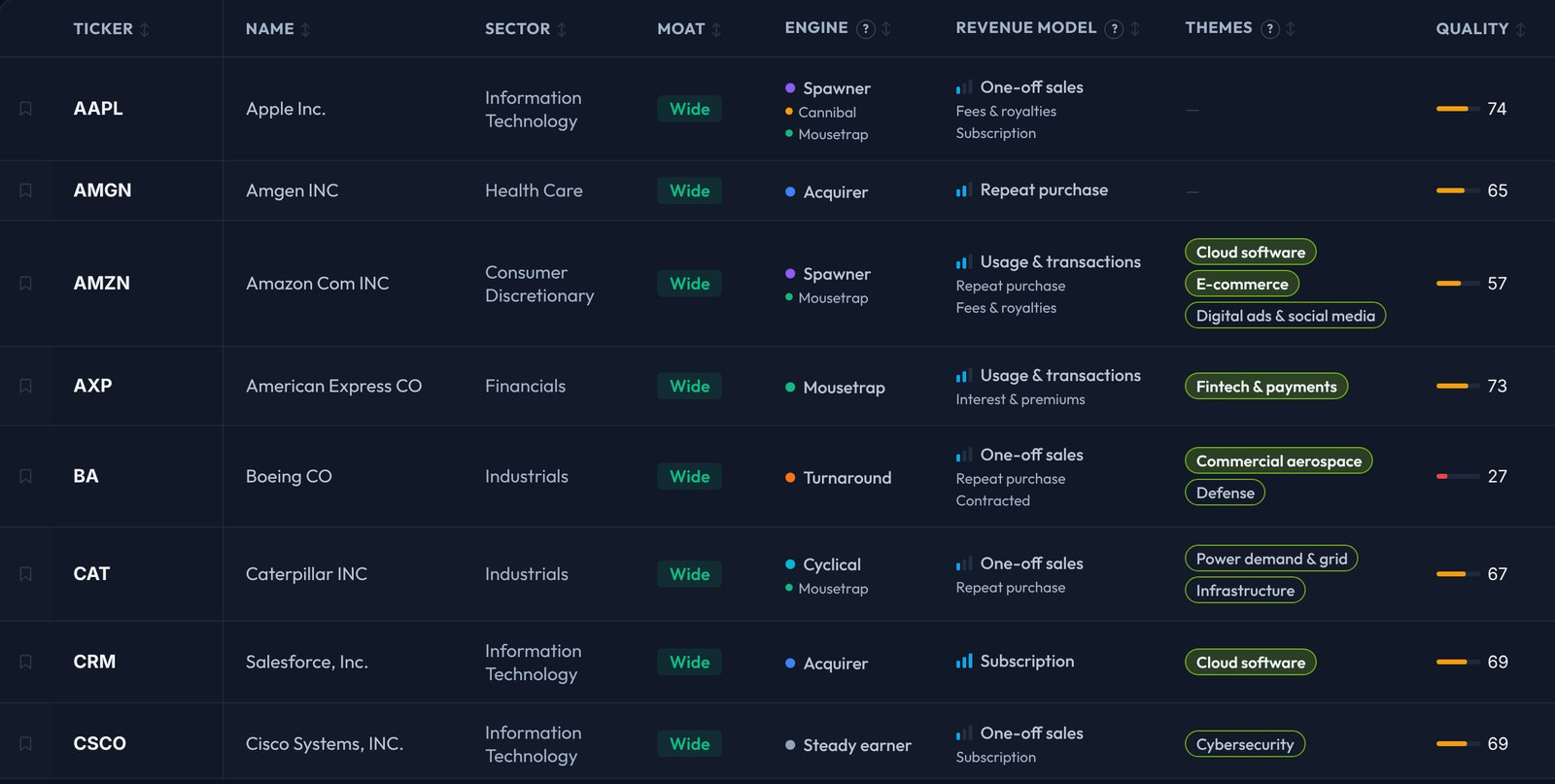
Three columns in the stock table, between the moat rating and the quality score, describe what kind of business each company is: where its shareholder return comes from (Engine), how it gets paid (Revenue Model), and which long-running trends it sells into (Themes). Each column header has a ? that opens its legend, each column sorts, and each has a matching filter in the left panel.
Engine
The engine says where a stock's shareholder return comes from. There are eight:
Mousetrap, Spawner, Cannibal, Acquirer and Turnaround follow Mohnish Pabrai's routes to multi-baggers; Cyclical, Steady earner and Speculative cover the businesses those routes leave out. A stock can have more than one engine: the main one comes first, the others follow in smaller type. Engines come from each company's filings and share price, refreshed daily.
Revenue Model
The revenue model says how a company gets paid. The bars show how predictable that makes its sales:
A company can have more than one model. The main one comes first and the others follow in smaller type; the main model is the biggest source of profit where that's clear, otherwise of sales.
Themes
Themes are long-running trends that cut across industries: 41 of them, in seven families. A company carries a theme when selling into that trend is its main business or a meaningful part of it, and many companies carry none.
A theme says what a company is exposed to, not whether the stock is cheap or good. Each theme has its own page listing every company that carries it; see Industries, Themes & Spin-offs.
In the stock panel
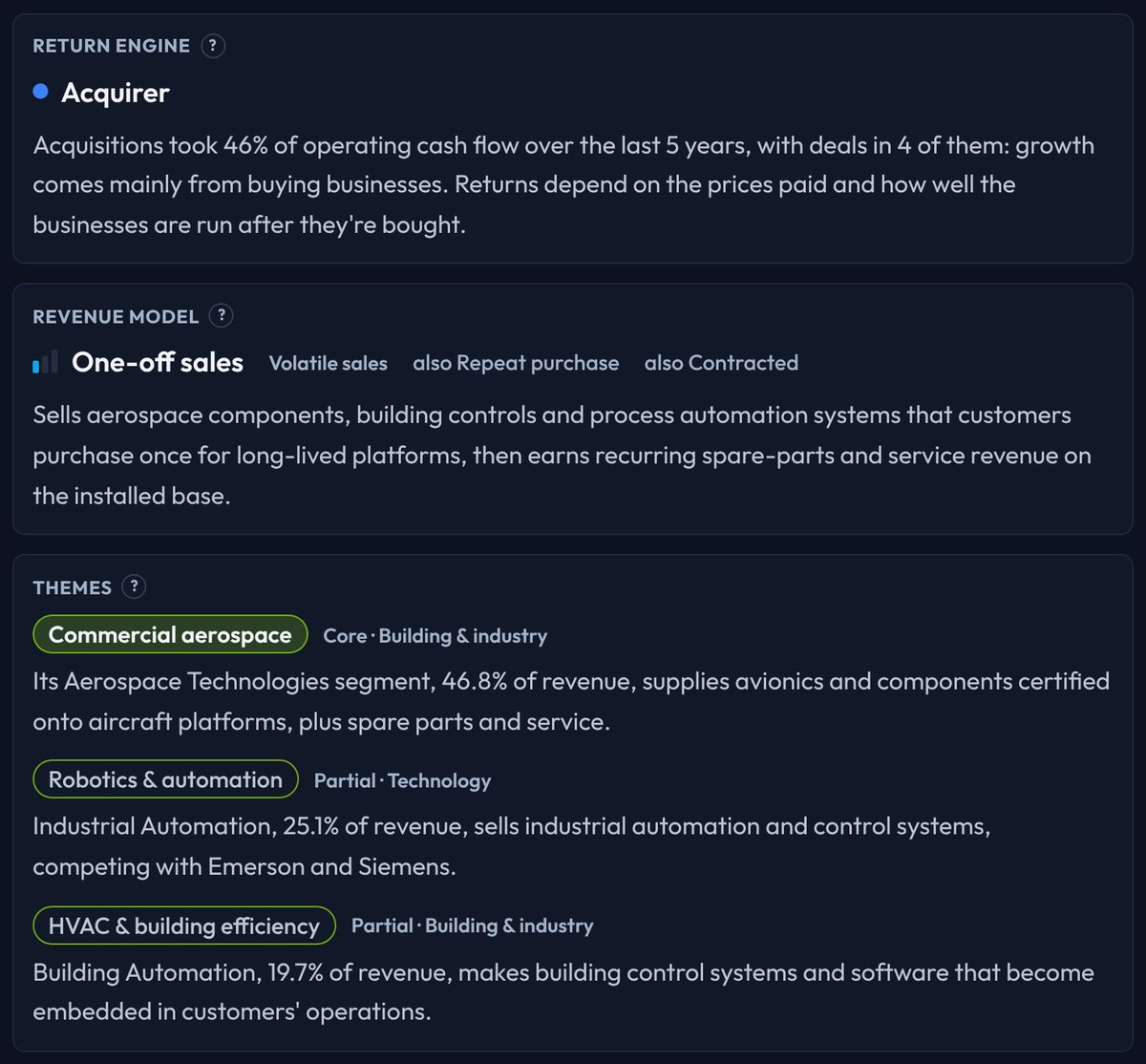
The Business tab of the detail panel has a card for each: the Return Engine card adds a write-up built from the company's own figures, the Revenue Model card a note on how this company gets paid, and the Themes card a note on how it is exposed to each theme, with a link to the theme's page.
🔍 Stock Detail Panel
Click any stock in the table — or any dot on the grid — to open its detail panel. At the top you'll always see the essentials: ticker, company name, moat badge, sector, and market cap, alongside two cards.
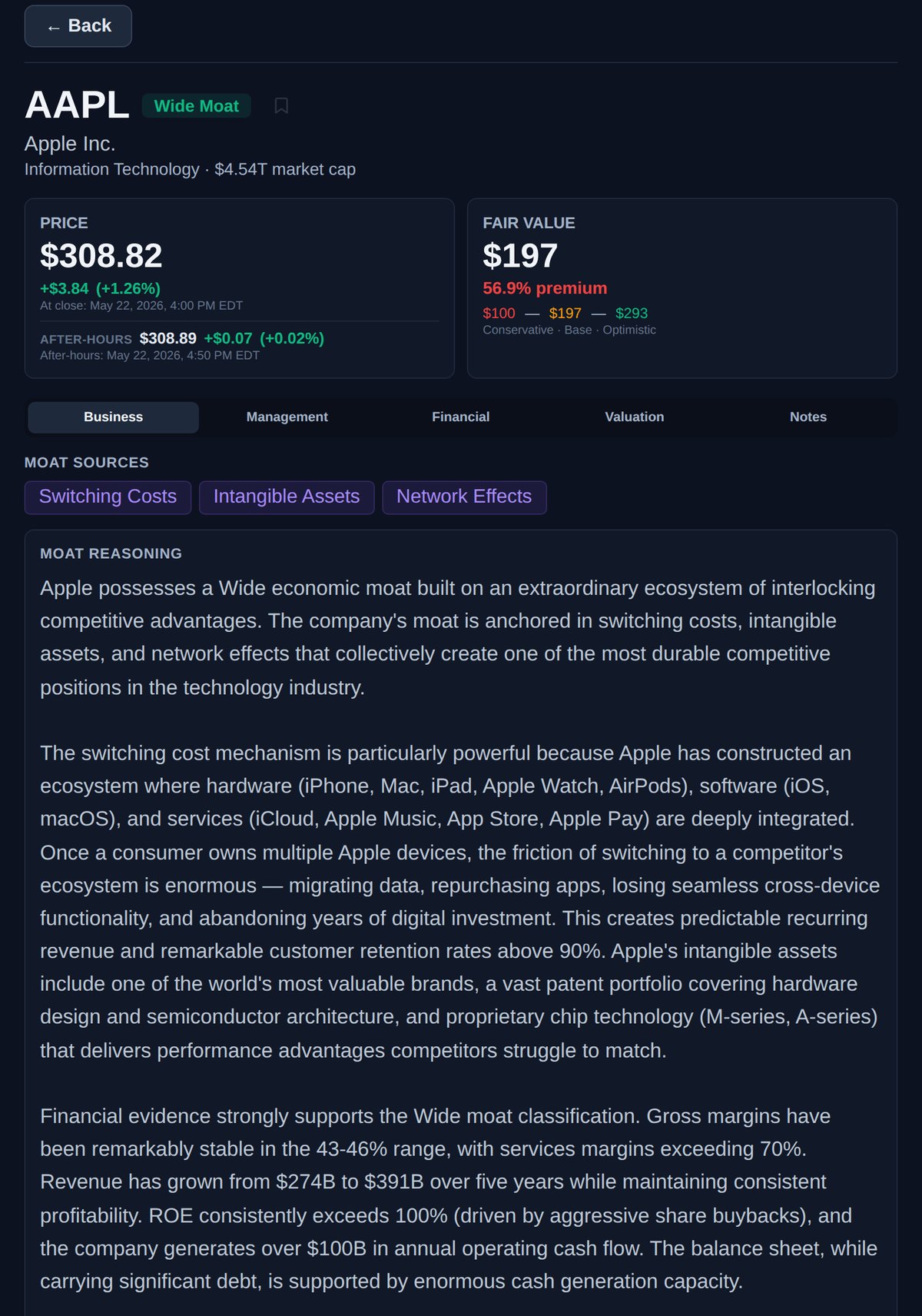
Price card: The latest price with the daily change. When a stock has traded after the close, an after-hours line appears below it with the extended-hours price and timestamp.
Fair Value card: The Base fair value estimate, the premium or discount to today's price, and the full Conservative → Base → Optimistic range beneath it.
Show Calculation: Expand this link under the cards to see the owner-earnings inputs behind the fair value for the most recent fiscal year.
Below the cards, five tabs organize everything MoatScope knows about the business:
Business — Moat sources and the full written moat reasoning; the Return Engine, Revenue Model and Themes cards; the quality score's history (and a moat timeline when the rating has changed); and the company profile (sector, industry, country, exchange, IPO date, market cap, website).
Management — A letter-grade evaluation of the CEO's stewardship, broken into six subscores with a plain-language verdict. Covered in detail below.
Financial — Four sub-views: Metrics (quality score, key ratios, and the seven pillars), Financials (full statements), Segments (revenue and operating margins by business segment, and revenue by geography), and Dividends (per-year history and growth streak).
Valuation — A price-history chart with the fair value overlaid. Covered below.
Notes — Your private research notes on the stock, saved to your account.
👔 Management Grade
Great businesses can still be run poorly. The Management tab grades how well a company's leadership has served shareholders — expressed as a letter grade from A to F with a 0–100 score, the CEO's name, age, and tenure.
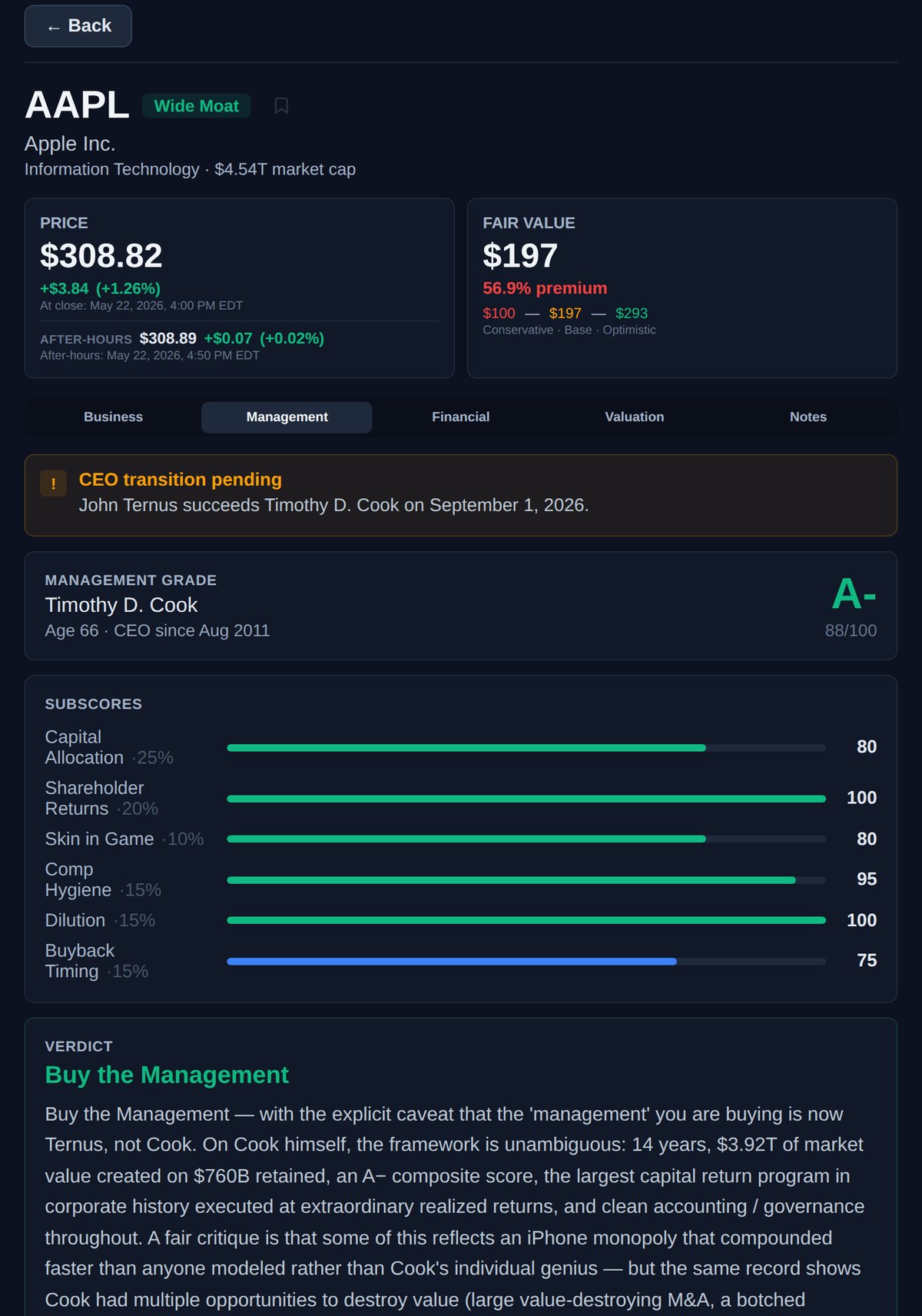
The grade is built from six weighted subscores, each measuring a different dimension of capital stewardship:
Every evaluation ends with a clear verdict:
📉 Price & Valuation Chart
The Valuation tab plots a stock's price history against MoatScope's fair value over time, so you can see at a glance whether today's price is unusual relative to the company's own history.
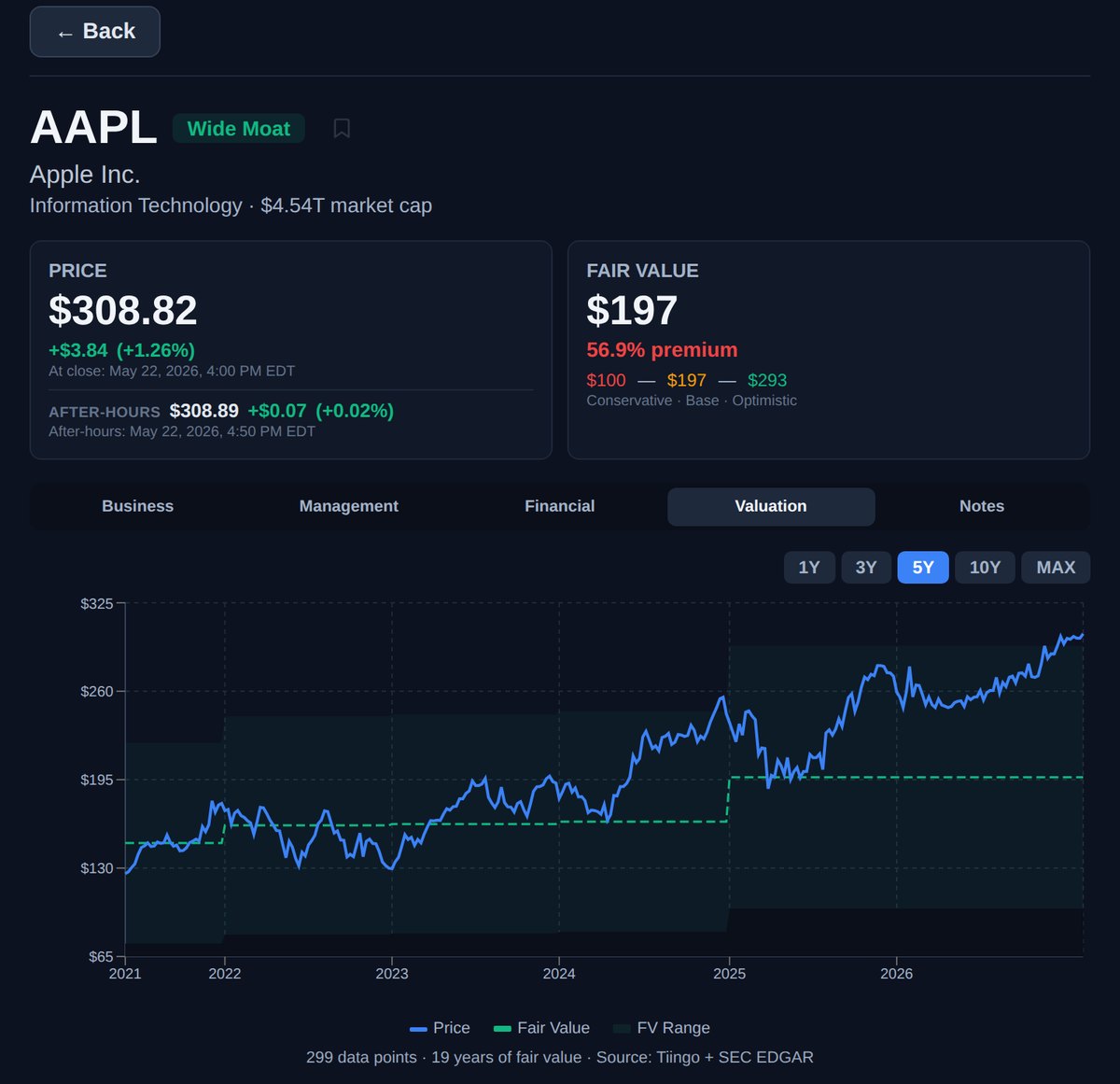
Price line — the stock's historical closing price.
Fair value line — MoatScope's Base estimate, recalculated each year from reported financials, so you can watch price and value diverge or converge.
Range band — the shaded area between the Conservative and Optimistic estimates.
Use the 1Y / 3Y / 5Y / 10Y / MAX selector to change the window. Prices come from market-data feeds, with current quotes from Tiingo; fair value is derived from SEC EDGAR filings.
🎛️ Filters & Screening
The left sidebar narrows the grid and the table. Filters work together, and most show how many stocks each option matches:

Switch between “All Stocks” and your custom baskets (watchlists).
DJIA (30 stocks), S&P 500, or NASDAQ 100.
Wide, Narrow, or None — for example, to focus on wide-moat businesses.
Switching Costs, Network Effects, Intangible Assets, Cost Advantage, or Efficient Scale. “Any” matches stocks with at least one selected source; “All” requires every one.
The management verdict: Buy the Management, Mixed, Avoid, Insufficient Tenure, or Unrated.
One or more of the eight engines. “All” matches every engine a stock has; “Main” matches only its main engine.
Grouped by how predictable sales are, from recurring revenue to not yet commercial, with the same All/Main choice.
Seven families, each opening to its themes. “Any” matches a theme whether it is core or partial; “Core” matches only themes that describe a company's main business.
Pick whole sectors, or open a sector to choose individual industries.
Mega (over $200B), Large ($10–200B), Mid ($2–10B), or Small (under $2B).
Founder-led companies, or companies by their CEO's age.
“+ Add metric” adds a range filter on any of 24 measures of growth, profitability, dividends, valuation, and financial health — revenue growth, return on invested capital, dividend yield, debt-to-equity, and more. A stock with no value for a metric is left out of that screen.
Limit the view to companies from one or more countries.
Below the chart, range sliders narrow the visible Quality Score and P/FV ratio, and an X-max control lets you zoom the valuation axis in on stocks trading near fair value.
Filter chips: every active filter appears as a chip above the table. Click its × to remove it, or Clear all to start over.
Saved filters: signed in, you can save the current set of filters under a name and re-apply it in one click (two saved filters on a free account, twenty on Pro and Max).
Sorting: click any column header to sort the table by it; click again to reverse.
Export: Max members can download the current view as a CSV, either the columns shown in the table or a fuller set.
From research pages: “Open in screener” on an industry or theme page opens the screener with that industry or theme already selected.
🗺️ Industries, Themes & Spin-offs
Beyond the screener, three sets of pages let you browse the market by where companies sit and what they sell into. They are open to everyone, and each links back to the screener.
82 industries across the 11 sectors. Each industry page explains how the industry works and lists its companies with their moat rating, quality score, and market cap, so you can compare any stock with its real peers and see where durable advantages cluster.
The 41 long-running trends, from AI hardware to pets. Each theme page lists the companies selling into the trend, core first, with their industry, moat rating, quality score, and market cap, plus how many have a moat and their average quality.
Every spin-off, split-off, and Reverse Morris Trust registered with the SEC, from the parent's announcement through the first three years of trading, with links to the Form 10 and information statement and, once the new company trades, its moat rating, quality score, and price-to-fair-value.
Every covered stock also has its own page at moatscope.com/stock/TICKER, with a summary of its moat rating, quality score, industry, and themes above the full detail panel.
📈 Financial Statements
Inside the Financial tab, the Financials sub-view shows complete statements pulled directly from SEC EDGAR XBRL filings, with a highlighted TTM (trailing twelve months) column alongside up to nearly two decades of annual history.
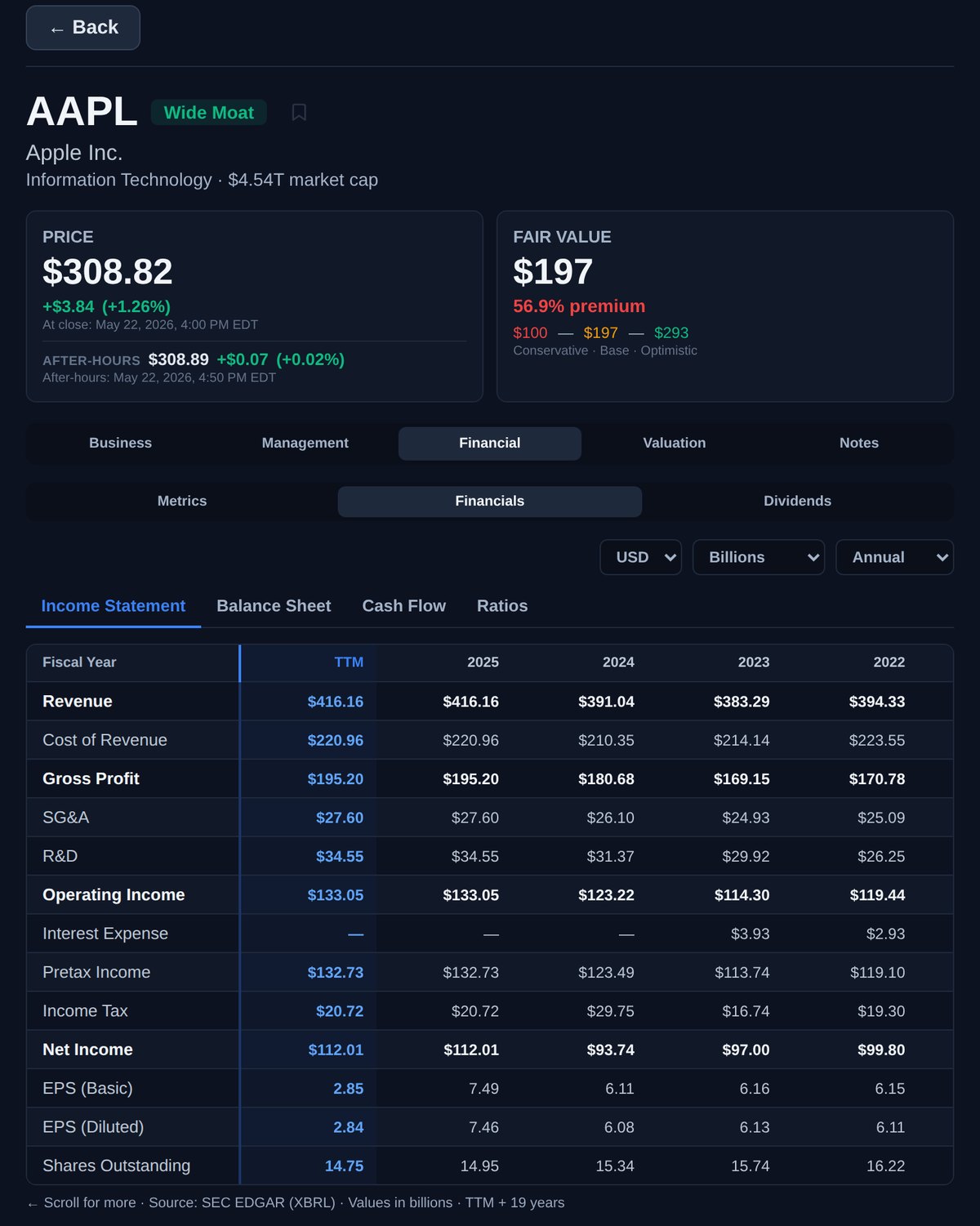
Income Statement — Revenue, cost of revenue, gross profit, operating income, net income, EPS.
Balance Sheet — Assets, liabilities, equity, cash, debt levels.
Cash Flow — Operating cash flow, capital expenditures, free cash flow, dividends.
Ratios — Key financial ratios computed from the statements.
Three dropdowns control the display: currency, scale (Billions, Millions, Thousands, or raw), and period (Annual or Quarterly). The Segments sub-view charts revenue and operating margins for each business segment the company reports, plus revenue by geography, and Dividends lays out per-year dividend history, payout ratio, growth, and the consecutive-raise streak for income investors.
🧺 Baskets & Notes
Baskets are custom watchlists that let you organize stocks into groups. Click the "Baskets" button in the top navigation to create and manage baskets.
Create a basket: Click "Baskets" → "New Basket" and give it a name (e.g., "Tech Leaders", "Dividend Growers").
Add stocks: Click the bookmark icon on any row of the table, or add a stock from its detail panel. You can keep up to ten baskets.
Filter by basket: Select a basket in the sidebar to view only those stocks on the scatter plot and table, in the order you set; drag stocks in the basket manager to reorder them.
Basket notes: The selected basket has its own note in the sidebar for your thesis, criteria, or review cadence.
Notes let you attach personal research notes to any stock. Use the Notes tab in the detail panel to jot down your thesis, key observations, or reminders. Notes are private and saved to your account.
💎 Plans & Pricing
MoatScope offers three tiers designed to give you the right level of access:
Full analysis on all Dow 30 stocks
Scatter plot & filters
Personal notes
Full blog & methodology
Fair value estimates
Moat reasoning & company write-ups
Management evaluations
Custom baskets & watchlists
Screener CSV export
Early access to new features
Priority support
Ready to find great businesses?
Start screening stocks through the lens of competitive advantage.
Open MoatScope →